Arguments, sentences, and the relations between them can be deleted
from the argument map using the
DELETE
key or the
Remove
button
 .
.
Note
The deletion of sketched or reconstructed attack and support relations is permanent! Deleted relations can only be restored by creating them again manually.Note
Arguments and sentences can appear in more than one argument map. Deleting an argument or sentence from one argument map does not automatically delete it from all other argument maps. Deleted arguments an sentences can be restored by copying them from another argument map to the current map.
Once an argument or sentence has been deleted from all argument maps,
it is automatically placed in the
Trash
 of the debate. From there it can either be deleted
permanently or reinserted into the argument map.
of the debate. From there it can either be deleted
permanently or reinserted into the argument map.
- Open the debate manager if it is not open yet. The debate manager is usually located above the argument map.
-
Click on the
Trash
tab. A list is shown which
contains all the elements that do not appear in any argument map any more.
-
If a deleted argument or a deleted sentence does not appear in the
list, it is either still part of another argument map, or the trash
has not been
updated yet. To check this, update the trash by clicking the
Update
button
 in
the right upper corner of the debate manager.
in
the right upper corner of the debate manager.
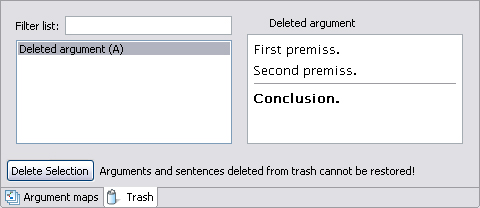
- Select the argument or the sentence you want to restore. The content of the selected argument appears on the right-hand side of the debate manager.
- Activate the argument map into which you want to re-insert the argument or sentence.
- Pressing the mouse button, drag the argument or sentence into the argument map, and release the mouse button.
The argument or sentence is restored and inserted into the argument map.
You can also delete an argument or sentence permanently from the debate.
Note
Caution! Once an argument or sentence has been deleted from the trash, it cannot be restored!- Open the debate manager, if it is not open yet. The debate manager is usually located above the argument map.
- Click on the Trash tab. A list is shown which contains all the elements that do not appear in any argument map any more. [#SCREENSHOT Papierkorb]
-
If a deleted argument or a deleted sentence does not appear in the
list, it is either still part of another argument map, or the#trash
has not been
updated yet. To check this, update the#trash by clicking the
Update
button
in
the#right upper corner of the debate manager.
- Select the argument or the sentence you want to restore. The content of the selected argument appears on the right-hand side of the debate manager.
- Click the Delete Selection button.
The selected argument is deleted from the debate permanently.
Thís tutorial has shown you the basics of logical reconstruction with Argunet. You can now extend the debate about software patents in order to practise reconstructing premiss-conclusion-structures and creating attack and support relations using the reconstruction wizard. The following tutorial will show you how to arrange the graph, use colour coding for the arguments ("families"), group the arguments, and use multiple argument maps.