After you have created an Argunet account, you can apply for access to online debates and open them. You can either gain access to Argunet debates by using a known debate password or by applying for access to the debate. The Editor of the debate can then accept you as Author or Reader .
The following steps describe how to open an online debate using a known password.
-
Start the "Open debate" wizard by clicking the
Open a debate
 button in the toolbar. Select
sokrates.philosophie.fu-berlin.de:5190/ArgunetServer
on the first page of the wizard.
button in the toolbar. Select
sokrates.philosophie.fu-berlin.de:5190/ArgunetServer
on the first page of the wizard.
-
Enter your login data (user name and password) and click
Next
to continue.
-
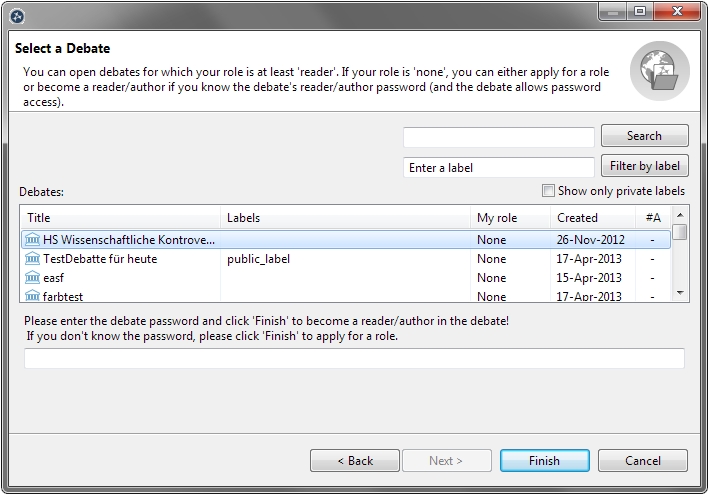
On the second page of the wizard, a list of all debates accessible
on the Argunet server appears. For each debate, the columns of this
table
show its title, your user role (i.e. user
rights)
in the debate
and the creation date.
- The first time you open an online debate, you do not have reader or author rights for any debate, so your role is None . To open an online debate, you must first be granted the relevant reader or author rights. For the purposes of this tutorial, select the "Software patents" (Softwarepatente) debate.
- An input field appears below the list of online debates. A debate password can be entered here to gain access to the selected debate. In this case, enter "reader" and click Finish .
- The wizard confirms that you now have access to the debate and opens the Argunet debate.

Even if you do not have a debate password, you can apply for access to an online debate. This procedure is described in the following steps.
- Start the "Open debate" wizard by clicking the Open a Debate button in the toolbar. Select sokrates.philosophie.fu-berlin.de:5190/ArgunetServer on the first page of the wizard. Enter your login data (user name and password) and click Next to continue.
- Select a debate you want to open, but for which you have no reader or author rights (user role None ). Click Finish . The wizard informs you that the editor of the debate will be notified about your application for access to the debate. As soon as the editor has reviewed your application and confirmed it, you will be notified via e-mail.
-
Start the
"Open debate" wizard
again, select the server
 sokrates.philosophie.fu-berlin.de:5190/ArgunetServer
, and enter your login data. The entry in the
My Role
column
indicates that you are applying for access to the debate
(user role
Applying
). As soon as the editor of the debate has granted you further
rights, you can select the debate from the list and open it by
clicking
Finish
.
sokrates.philosophie.fu-berlin.de:5190/ArgunetServer
, and enter your login data. The entry in the
My Role
column
indicates that you are applying for access to the debate
(user role
Applying
). As soon as the editor of the debate has granted you further
rights, you can select the debate from the list and open it by
clicking
Finish
.