Debates can be compared to large cities. Complex debates are often so extensive that they cannot be visualized clearly on one argument map. In these cases, the debate can be split into several argument maps.
-
Open the debate manager if it is not open yet. The debate manager
is usually located above the argument map.
- Select the Argument maps tab. A list of all argument maps is shown.
-
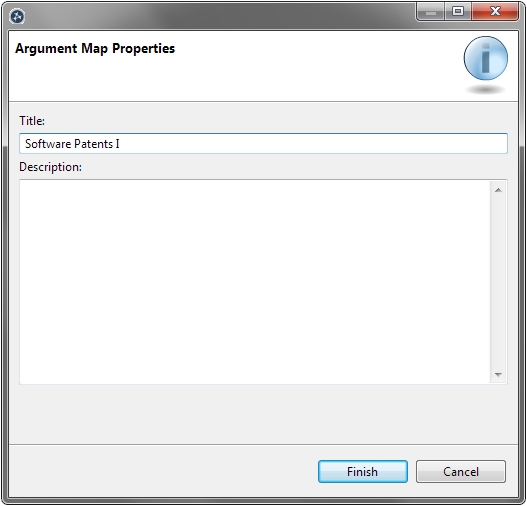
Click on the green plus sign. A dialogue box opens with
which a new
argument map can be created.
- Add a title for the new argument map and add a description (optional).
- Click the Finish button.
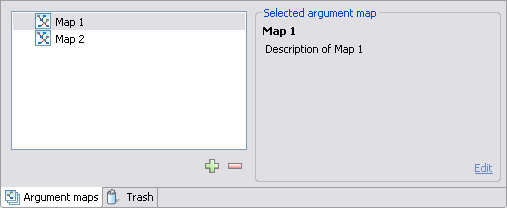
The new argument map appears in the list and is opened.
- Open the debate manager if it is not open yet. The debate manager is usually located above the argument map.
- Select the Argument maps tab. A list of all argument maps is shown.
- In the list, select the argument map you want to delete.
- Click on the red minus sign.
- A dialogue box opens. Click OK .
The argument map is deleted.
Caution
The deletion of argument maps is permanent!
Arguments can be copied from one argument map to another. This, for example, enables the user to move certain parts of a reconstruction to a separate argument map.
Note
Arguments can also be copied between argument maps belonging to different debates.- Activate the argument map from which you want to copy arguments.
- Select the arguments to be copied.
-
Click the
Copy
 button in the toolbar.
- Activate the argument map into which you want to paste the arguments.
-
Click the
Paste
 button in the toolbar.
The arguments are added to the argument map.
Note
Arguments can also be copied from one argument map to another using Drag and Drop . To do this, open two argument maps next to each other, and drag a selected argument from one map to the other while pressing CTRL (Windows, Linux) or ALT (Mac).